
To remove the 'evaluation version' message on your ViArt, you will need to purchase a unique license and generate a license.php. Please read this section to get the instructions on the process of activation.


|
Bonus Points functionality is a rather huge customer loyalty feature that can be extremely useful for your site if you are interested in encouraging your clients for their purchases and giving them an opportunity to accumulate points and pay for their purchases with these points. Therefore, the module comprises of two parts, namely: receiving point credits and payment with these point credits. What one needs to do to receive points? Simply purchase some product and receive points that you previously set per product(s). When a user accumulates enough points, he will be able to purchase items with the accumulated point credits (if an appropriate option is activated) and even pay for the shipping charges. On the first step of ordering you have the choice: for what items to pay with your points credits and for what items to pay with money. Please note that if your customers want to use or receive points they are to be registered users. So, you will definitely want to know how to setup the Points functionality. The below guide will give you the necessary tips. General Settings The main settings for points functionality are done via Administration > Products > Products Settings > Points Tab. See below a sample: 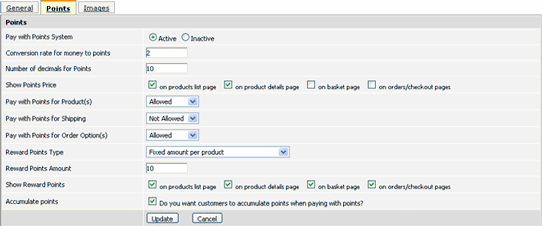 Conversion rate: This is the rate which converts the price of the product to points. In other words, the price of the product multiplies to the number you specify in this field. For example, if you set the conversion rate to 2 and the price of your product is $100, then the point price will be 200. So, if you accumulate 200 points you are able to purchase the product with points. Number of decimals for Points: This means in what format you would like your points to be displayed and calculated. If you specify '0' in this field, then your points will be displayed like 70. In case you specify '4' - max allowed value in this field, then the points’ amount will be equal to 70.0000. Reward Points Amount: In this field you specify how many points you want to award your customer for purchasing the product(s). You have a choice to set either general rewards amount which will applied to all products or an individual rewards points amount for a specific product. The general rewards amount is set via Administration > Products Settings > Points Tab, while the points specific amount is attuned on the Edit page of the product. Setting points for a specific product You can set points per a specific product only. For this, go to Administration > Products > Products&Categories > Edit Product Page > Points Tab. Please note that if you leave the ‘Points Price’ field blank then the points’ price will be calculated by the points conversion which is set on the Products Settings Page. For example, if the product costs $100 and the conversion rate is set to 10, then one product will cost 1000 points. Set Points per User Type In addition, you are allowed to set Reward Points Amount and Reward Type for a certain type of Customers (Administration > Site Users > Profile Settings > Edit Type > Points Section), per each customer (Administration > Site Users > Accounts > View/Edit Info), per each Product Type (Administration > Products > Products Types). Configure points for Order Status The deduction or accumulation of the points from the user's balance is made automatically if you activate the option 'Subtract points from user balance' or ‘Return points to user balance’ option in the 'Points Action' field for appropriate statuses. For example, if you have the status 'Confirmed by User' for all your new orders, you activate the mentioned option for this status and the points are deducted from the user's balance when the order with this status is received. If you go to Administration > Site Users > Accounts, you will notice the new column ‘Points’. By clicking on the ‘Points’ link you will get to the page where you can edit the points balance of your users. 1. I want each Bonus Point to be worth $0.005 on redemption. Or this would be shown that 200 points will earn $1 off the sales total when redeemed? In this case the conversion rate for money to points will be 200. 2. Can I change this by product - e.g. if I want to allow customers to redeem 200 points for a $2 discount for hair products?
Yes, it's possible to specify exact price in points for certain products. For instance, you can add special offers for some products, like buy this product only for 10 points. 3. Can I choose to issue a higher rate of points on some products? E.G. where a product is more profitable I would offer more points. Yes, sure. You can set a higher rate of points per each particular product via Administration > Products > Products&Categories, select a certain product and click the 'Points' tab. 4. Can the variation by product be created by product type? This would save the tedium of having to change dozens of products. Unfortunately, so far there is no possibility to set different points rate per each product type. 5. in : Administration > Order Statuses > Edit Status there is the field: Points Action with options: Subtract points from user balance Return points to user balance Could you please explain this? This means that for some order status you can select whether to subtract points from a user balance or not. For example, as a rule when the status of the order is changed to a Paid and a user pays with points for some products it can automatically subtract the points from his balance. In case you decide, for some reason, to Refund the order with the product bought for points and set an appropriate status with the 'Return points to user balance' option, it will automatically return the points amount to a user balance. |
|
|

